

On this page (11 sections)
Deposits, networks and fees: the crypto side first
Mobile crypto gambling adds a layer most reviews skip: you are usually moving funds between a phone-based wallet app and a casino cashier, both on a small screen where a mistyped address or wrong network is easy to miss.
Roobet is a crypto-first casino, meaning deposits and withdrawals move as cryptocurrency rather than card payments. On mobile, that means whichever wallet app you use must send funds on the exact network the Roobet cashier is expecting — mismatched networks are the most common way mobile deposits are lost.
Roobet mobile cashier at a glance
- Deposit speed
- Network confirmations, typically minutes
- Withdrawal processing
- Varies with network load and internal review
- Supported networks
- Listed per coin on the deposit and withdrawal screen
- Operator withdrawal fee
- Shown in the cashier before you confirm
- KYC trigger
- Applied at the operator's discretion — triggers are not published
The rule that saves mobile deposits
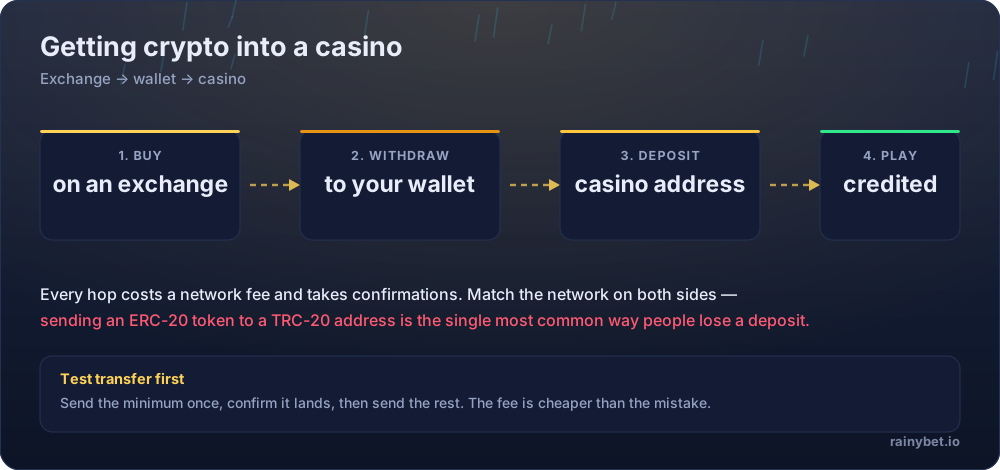
Send the smallest amount your wallet allows as a test transfer before committing the rest. It costs one network fee. A cross-network mistake costs the entire deposit and cannot be reversed by support, on mobile or desktop.
Is there an official Roobet app?
A network mismatch occurs when a crypto deposit is sent using a different blockchain network than the one the receiving address expects — for example, sending an ERC-20 token to a TRC-20 address. It is one of the most common ways a crypto deposit is lost outright, with no way for support to recover it.
Roobet is designed to run through a mobile browser rather than requiring a download from an app store on every platform. Always start from the operator's own official domain rather than a search result or a link shared in a chat group.
The scam pattern to know
Fake 'Roobet app' listings and APK files are a known way to steal login credentials and wallet seed phrases. A legitimate casino never needs your wallet's seed phrase for anything — if an installer asks for one, close it immediately.
Getting set up on mobile, step by step
Five steps, treating mobile setup as a security task first
- Open Roobet's official site directly in your mobile browser, using the code
ROOSPINSif you want the 7-day cashback attached. Open the Roobet signup pageWhere people trip up: Bookmark the address you land on. Do not rely on search results for future visits — phishing clones commonly outrank the real domain in ad slots.
- Complete registration and find the referral or promo code field, checking it is not collapsed behind a toggle your thumb scrolled past.
Where people trip up: Small screens hide fields more easily than desktop layouts — scroll the full form before submitting.
- Add the site to your home screen through your mobile browser's 'Add to Home Screen' option for app-like access without an app store download.
Where people trip up: This is not the same as installing a native app, but it gives a one-tap icon without any of the third-party installer risk.
- Set a deposit limit in account settings before your first transfer.
Where people trip up: It is easier to overspend from a phone than a desktop, simply because it is always in your pocket.
- Send a small test deposit first, matching the network exactly, then confirm it credits before sending the rest.
Where people trip up: One test transfer costs a single network fee. Skipping this step is the most expensive mobile mistake on this page.
Using ROOSPINS on a phone
The code behaves identically on mobile and desktop: 20% cashback for 7 days from activation. The only mobile-specific risk is typing it wrong — autocorrect loves to capitalise, add a space, or substitute a similar-looking character.
After entering it, check the promotions panel to confirm it is attached before you deposit anything, exactly as you would on desktop. See our Roobet referral code guide for the full activation walkthrough.
Mobile bonus terms in one table
| Term | What applies |
|---|---|
| Bonus code | ROOSPINS |
| What the code unlocks | 20% Cashback for 7 Days |
| Offer type | Time-boxed cashback |
| Minimum qualifying deposit | Set in the cashier — shown at deposit |
| Wagering requirement | Set out in the operator’s bonus terms |
| Maximum bet while bonus is active | Defined in the bonus terms — check before staking up |
| Bonus validity window | Stated on the promotion page at activation |
| Game weighting | Published in the operator’s weighting table |
| Maximum cashout from bonus funds | Capped per the bonus terms where a cap applies |
| Sticky or non-sticky | Declared in the bonus terms per offer |
Mobile-specific traps to avoid
The small print on Roobet — read this part twice
- Fake app installers. Only ever use the official site or an app-store listing verified as the operator's own — never a shared APK file.
- Clipboard-altered wallet addresses. Some clipboard managers modify copied text. Check the full address after pasting, not just the first few characters.
- Autocorrect on the code field. Type
ROOSPINSmanually or check it carefully after pasting — a trailing space is invisible but breaks activation. - Public Wi-Fi during a deposit. Use a private connection for anything involving a wallet, exchange login, or casino cashier.
- Assuming mobile changes the bonus terms. It does not — wagering, expiry and weighting are account-level and stay the same regardless of device.
Terms are the operator’s to change. If a clause below no longer matches what you see in your account, the account version wins — and we want to hear about it.
Playing Originals on a small screen
Crash, Mines, Plinko and Mission Uncrossable are all built to run in a mobile browser without a plugin. The higher-variance titles like Crash are easier to overplay on mobile simply because a round takes seconds and the next one is a single tap away.
Our Crash simulator and Plinko simulator are both mobile-friendly if you want to test a cash-out strategy before wagering real funds on your phone.
Honest pros and cons
What works about Roobet
- Browser-based access removes the risk of a fake third-party app installer entirely
- Home-screen shortcuts give near-native access without an app store download
- Bonus mechanics and terms are identical between mobile and desktop
- Core Originals run smoothly in a mobile browser with no plugin required
What to weigh up first
- No confirmed dedicated native app to quote here
- Small screens make it easier to miss a collapsed code field or truncate a wallet address
- Fake installer scams specifically target casino brand names, Roobet included
- Higher-variance games are easier to overplay when a round is a single thumb-tap away
Who the mobile setup suits
Works well if you are comfortable using a mobile browser and a mobile crypto wallet, and you are willing to double-check network and code fields before submitting on a small screen. Less suited if you would rather manage crypto deposits on a desktop where addresses and fields are easier to verify visually.
Licence, geo-restrictions and playing safely
Licensing. Access is blocked in a number of countries and US states, and the list is maintained by the operator rather than published as a stable document. The current restricted list and licence details live on the operator’s own terms page — read them before you register.
Your side of it. Crypto casinos settle fast, which is exactly what makes them easy to overplay. Before your first deposit at Roobet, set a deposit cap and a session timer in the account settings — not in your head.
- Deposit limits and self-exclusion tools live in account settings, not support chat
- A losing session is not a signal to raise the stake — it is a signal to stop
- Bonus turnover targets are not a reason to keep playing past your limit
- Free, confidential help: BeGambleAware and Gambling Therapy
Frequently asked questions
Is there an official Roobet app?
Roobet is built to run through a mobile browser as a responsive site rather than a listing you download from an app store on every device. Check the official site directly for your device before installing anything claiming to be a Roobet app from a third-party source.
Is it safe to download a Roobet APK from outside the official site?
Treat any Roobet installer not linked directly from the operator's own domain as unverified. Fake casino apps are a known phishing vector for stealing login details and wallet seed phrases — never enter a seed phrase into an app you found outside an official store or the operator's own site.
Can I use ROOSPINS on mobile the same way as desktop?
Yes. The code, its 20% cashback and its 7-day expiry are account-level, not device-level — activating on mobile or desktop makes no difference to the mechanic.
Does the Roobet mobile experience support all the same games?
The core house-made Originals — Crash, Mines, Plinko, Mission Uncrossable — are built to run in a mobile browser. Exact parity across every third-party slot title is not something we can confirm as a fixed list here.
What crypto networks does Roobet support?
We do not have a fixed, published list of supported coins and networks to quote here. Confirm the exact network in your account's cashier before sending a deposit from any device.
Does mobile data or Wi-Fi affect deposit speed?
No — deposit speed is a function of blockchain network confirmations, not your connection type. A slow mobile connection will not speed up or slow down how quickly a transaction confirms on-chain.
What is the biggest mobile-specific mistake to avoid?
Autocorrect and trailing spaces in the referral code field, and pasting a wallet address from a clipboard manager that silently altered it. Always check both fields character by character before submitting on a phone.