

On this page (10 sections)
Deposits and withdrawals on mobile: the crypto reality
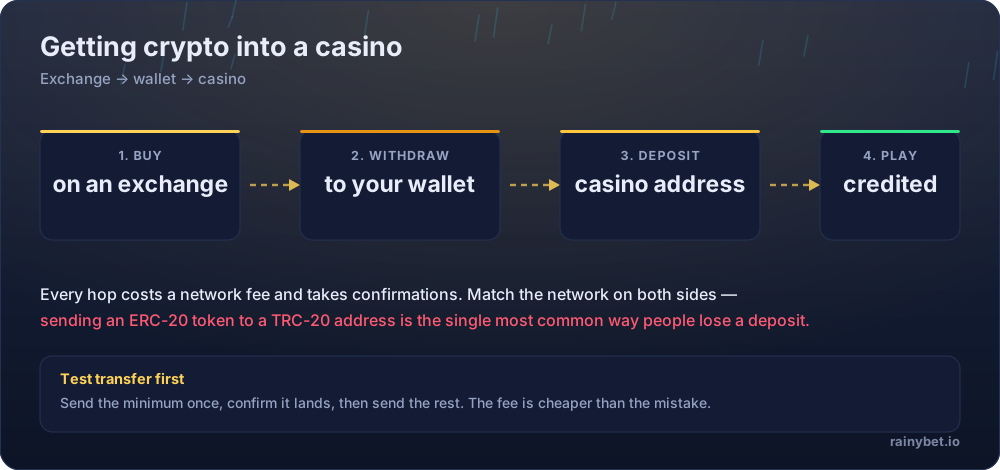
A network fee is the transaction cost charged by a blockchain network itself, separate from any fee the casino or exchange charges — it applies regardless of device, and it is lost along with the rest of a deposit if sent on the wrong network.
Before the app question, the part that actually costs money: mobile crypto deposits carry the same network-matching risk as desktop ones, with an added complication — copying a wallet address on a small screen is easier to get wrong.
The mobile-specific mistake
Switching between a mobile wallet app and Gamdom's mobile browser tab to copy an address increases the chance of copying a stale clipboard entry or a truncated address. Double-check the full address string before confirming a transfer.
Gamdom mobile cashier at a glance
- Deposit speed
- Network confirmations, typically minutes
- Withdrawal processing
- Varies with network load and internal review
- Supported networks
- Shown per coin on the deposit screen
- KYC trigger
- Applied at the operator's discretion — triggers are not published
Fees, confirmation times and KYC triggers are identical whether you access Gamdom through a browser tab, a PWA icon on your home screen, or desktop — the underlying account and wallet are the same in every case.
Is there a native Gamdom app?
A native app is software built specifically for iOS or Android and distributed through the App Store or Google Play, subject to each platform's review process. Real-money gambling apps are restricted or banned from both stores across most regions, which is why crypto casinos rarely have one.
Gamdom's mobile experience runs through the browser rather than a store-listed app. That is standard for this category, not a shortcoming specific to Gamdom — Rainbet, Stake and Thrill all follow the same pattern for the same reason.
PWA vs native app: what's the difference?
| Native app | Progressive web app (PWA) | |
|---|---|---|
| Distributed through app stores | Yes | No — added to home screen from the browser |
| Subject to store review | Yes | No |
| Update mechanism | Store push updates | Updates instantly with the website |
| Typical for real-money crypto casinos | Rare, due to store policy | Common |
| Feels like a native app in daily use | Yes, by definition | Close, for most everyday use |
A progressive web app (PWA) is a website that can be added to a phone's home screen and launched like an app, using the phone's browser engine rather than a store-installed binary.
Why app store policy keeps real-money casino apps out
Apple's and Google's developer guidelines both restrict real-money gambling apps heavily, often requiring specific regional licensing agreements most crypto casinos don't hold, or banning the category outright depending on the store region. Crypto-funded gambling adds an extra layer of scrutiny on top of that.
This is a policy constraint on the stores, not a signal about the operator's legitimacy. A missing store listing tells you about Apple and Google's rules, not about Gamdom's trustworthiness — see our full Gamdom review for that separate question.
The APK risk: why sideloading is dangerous
The small print on Gamdom — read this part twice
- Third-party APKs bypass store security scanning entirely. An app downloaded from an unofficial mirror has not been checked by anyone for malware.
- Fake gambling APKs are a documented risk pattern. Cloned apps bundled with credential-stealing malware specifically target crypto casino users, because a compromised login has direct financial value.
- A recognisable, long-running brand is a bigger target, not a smaller one. Years of community mentions and brand recognition give fake 'Gamdom app' listings a ready-made audience to impersonate.
- An APK cannot be meaningfully verified by a casual user. There is no reliable way to confirm a sideloaded file matches what the operator actually built.
- The safer default is the browser or a PWA from the operator's own domain. If an APK is ever offered, download it only from a link posted on Gamdom's own official site — never from a third-party 'app download' aggregator.
Terms are the operator’s to change. If a clause below no longer matches what you see in your account, the account version wins — and we want to hear about it.
How to install the Gamdom PWA properly
Four steps, no app store required
- Open the official Gamdom site in your mobile browser. Open Gamdom on mobile
Where people trip up: Confirm the address bar shows the correct official domain before doing anything else.
- Open your browser's menu and look for 'Add to home screen' or 'Install app'.
Where people trip up: The exact wording differs between Safari and Chrome, but the option exists in both.
- Confirm the name and icon, then add it to your home screen.
Where people trip up: This creates a shortcut, not a separate download — nothing is being sideloaded.
- Launch from the home screen icon going forward for the closest experience to a native app.
Where people trip up: Log in again if prompted — the PWA session is separate from your regular browser tab session.
Mobile security checklist
- Only ever install from Gamdom's own official domain, never a third-party app repository
- Keep two-factor authentication enabled — mobile logins are not exempt from account takeover risk
- Avoid public Wi-Fi for logins or transfers on mobile, same as on desktop
- Double-check any copied wallet address in full before confirming a mobile deposit
- Never install an APK offered through a link in an unsolicited message or ad
Honest pros and cons of the mobile experience
What works about Gamdom
- PWA installation gives an app-like experience without any sideloading risk
- Full account and wallet parity with desktop — nothing is mobile-exclusive or missing
- Updates instantly with the site, with no separate app-store update cycle to wait on
- Crash, Roulette and the rest of the catalogue run the same on mobile as desktop
What to weigh up first
- No store listing means no store-level malware scanning or review process at all
- Address-copying mistakes are easier to make on a small screen during a deposit
- A well-known, long-running brand name draws more fake-app impersonation attempts, not fewer
- No confirmed dedicated native app to quote here — check the App Store or Google Play directly for the current listing
Licence, geo-restrictions and playing safely
Licensing. Access is blocked in a number of countries and US states, and the list is maintained by the operator rather than published as a stable document. The current restricted list and licence details live on the operator’s own terms page — read them before you register.
Your side of it. Crypto casinos settle fast, which is exactly what makes them easy to overplay. Before your first deposit at Gamdom, set a deposit cap and a session timer in the account settings — not in your head.
- Deposit limits and self-exclusion tools live in account settings, not support chat
- A losing session is not a signal to raise the stake — it is a signal to stop
- Bonus turnover targets are not a reason to keep playing past your limit
- Free, confidential help: BeGambleAware and Gambling Therapy
Frequently asked questions
Is there an official Gamdom app to download?
Real-money crypto casinos, Gamdom included, are generally excluded from Apple's App Store and Google Play by platform policy. What's typically offered instead is a mobile-optimised website or a progressive web app (PWA) added to your home screen — not a listed store app.
Can I download the Gamdom app on iPhone?
There is no App Store listing to download from, because Apple's guidelines restrict real-money gambling apps in most regions. A PWA added to your home screen behaves similarly to a native app for everyday use.
Is there a Gamdom app download for Android?
The same store restriction generally applies to Google Play. Some crypto casinos distribute an APK file directly for Android instead — a practice that carries meaningfully more risk than a store-verified install, covered below.
Is it safe to download a Gamdom APK from a third-party site?
Treat any APK not distributed directly from Gamdom's own official domain as unverified. Sideloaded APKs bypass the security scanning app stores perform, and fake gambling APKs bundled with malware are a documented risk pattern across the crypto casino category — a recognisable, long-running brand name is a more attractive target for this, not less.
What's the difference between a PWA and a native app?
A PWA (progressive web app) runs through your mobile browser's engine but can be added to your home screen and used like an app, without app-store distribution or approval. A native app is built specifically for iOS or Android and distributed through their respective stores.
Does the mobile experience have the same games as desktop?
The mobile site or PWA typically mirrors the desktop catalogue, including Crash and Roulette, since both draw from the same account and wallet. Confirm any game-specific behaviour directly in your account rather than assuming full parity.